

Published: July 15, 2026 | Last Updated: July 15, 2026
AI Workloads: Data, Compute, and Storage Needs Explained

Table of Contents
AI workloads are data-intensive processes that power artificial intelligence systems. Today, they’re reshaping what organizations need from their data center infrastructure. Training, tuning, and running AI models can require high-density compute, low-latency networking, scalable storage, and cooling systems designed for power-intensive environments.
With AI workloads expected to make up 71% of data center demand by 2030, according to McKinsey, the pressure to support AI at scale is growing. IT leaders need to optimize their existing infrastructure strategy — including data centers, cloud, and colocation — to support the performance, capacity, and resilience these workloads demand.
Key Takeaways
- AI workloads often require more compute, storage, networking, power, and cooling capacity than traditional enterprise applications.
- GPU-based infrastructure and high-density computing can support demanding AI training and inference workloads.
- Storage and networking decisions matter because AI workloads depend on large datasets, fast data movement, and low-latency access.
- Advanced cooling, including liquid or hybrid cooling approaches, may be needed as rack densities increase.
- Colocation can be a strong option for organizations that need more control, predictable performance, cloud connectivity, and scalable infrastructure for AI workloads.
What Are AI Workloads?
AI workloads can be used to train, execute, and maintain artificial intelligence models. Different types of workloads are used to accomplish different tasks:
- Predictive analytics and forecasting: Customer behavior, maintenance needs, and sales trends can be predicted by training AI models on historical data.
- Natural Language Processing (NLP): Many users are now familiar with NLP – chatbots and virtual assistants use NLP to understand inputs and generate outputs that take after human language.
- Anomaly detection: By training AI on common patterns, this technology can identify unusual events in data sets. This can be used for fraud detection, catching possible cybercrime activity, or pinpointing equipment malfunctions.
- Image or video recognition: Similarly, AI can be used to identify objects, activities, and scenes in images and videos. This technology can be used by healthcare to analyze imaging, or by security systems to recognize faces.
- Recommendation algorithm: AI models can understand which products and services people may need by analyzing past browsing and purchase behaviors.
AI workloads are expected to increase. In our survey of 500 IT decision-makers, 56% of organizations reported plans to adopt or invest in artificial intelligence and machine learning over the next five years.
The Data, Compute, and Storage Requirements of AI Workloads
Because AI workloads are capable of so much, their computational requirements are much greater. They require complex computations, massive datasets, and a need to store and scale that greatly surpasses the needs of traditional workloads.
Training AI models requires massive datasets that have millions, or even billions, of data points. This calls for significant computational power. Central processing units (CPUs) typically handle one task at a time. AI workloads rely on parallel processing to break operations into chunks that can be handled simultaneously for faster computations. Graphical processing units (GPUs) excel at parallel processing and are necessary to accelerate AI workloads. The GPU market is on the rise and is grow more than sixfold by 2030.
In the training phase, AI models need significant resources; however, these needs fluctuate depending on future applications. Storage needs can also ebb and flow. High-performance storage solutions, such as solid-state drives (SSDs), as well as cost-effective object storage, are important for short-term access and long-term archiving of immense amounts of data.
5 Challenges of Managing AI Workloads
Because of these requirements and more, managing AI workloads in data centers can be difficult if the facility isn’t ready to meet the need. Networking, processing, and scalability features need to be in place for AI workloads to be functional.
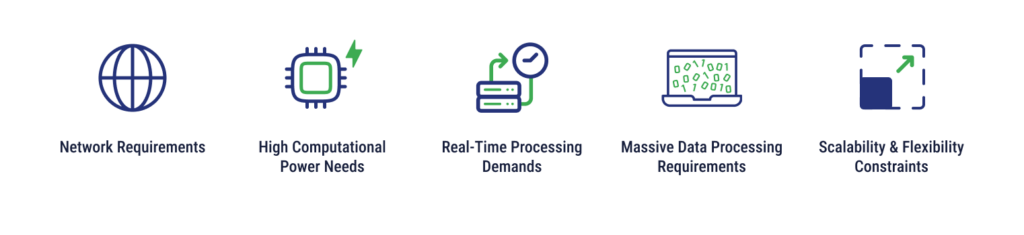
Network Requirements
Because AI workloads tend to transfer large amounts of data between storage systems and compute resources, businesses need a solution that offers low latency and high bandwidth. Traditional data centers can be too sluggish to accommodate AI operations.
High Computational Power Needs
As previously mentioned, GPUs and specialized AI accelerators (TPUs) can aid in parallel processing and support AI workloads in a way that traditional data centers with CPUs cannot. More complexity also enters the picture when more diverse hardware resources are added into the mix.
Real-Time Processing Demands
Real-time processing is already becoming essential for certain AI applications, including autonomous vehicles and fraud detection systems. When it comes to driving, even a split second of delay can lead to catastrophic results. Effective real-time processing requires powerful hardware, efficient data pipelines, and optimized software frameworks.
Massive Data Processing Requirements
Data centers need to be able to process the data used by AI models and meet storage, cleaning, and pre-processing requirements. What happens to the data throughout its lifecycle? Data centers need to manage the archival, deletion, and anonymizing of data as well. All touchpoints along the data’s lifecycle add layers of complexity to the process.
Scalability and Flexibility Constraints
Traditional data centers don’t tend to offer as much flexibility or scalability, making it more difficult for businesses to change resources to meet fluctuating needs. Training can require significant resources, while deployment may vary in its demands. Rigidity can slow down or stop the effectiveness of AI workloads.
Can High-Density Computing Support and Optimize AI Workloads?
High-density computing (HDC) is a good fit for organizations looking to support and optimize AI workloads. As the name suggests, HDC can fit more processing power into a smaller footprint, leading to the following benefits.
Stronger Compute Density
A stronger compute density equals stronger processing power in a limited space, which can enable AI workloads to handle massive data sets and complex algorithms necessary for both training and execution.
Decreased Latency
When resources are packed more tightly together, travel distances are also decreased between components. In HDC environments, latency goes down due to the minimization of travel time. Latency is hugely important for real-time applications that require instantaneous responses.
Better Scalability
Because more resources can be packed into one rack, HDC is also great for scalability. New computing units can be added to existing racks and meet increased processing needs. Scaling down is just as easy.
Improved Resource Utilization
High-density computing offers a smaller space solution for businesses employing AI workloads, and the smaller footprint also promotes better resource utilization. Hardware is used more efficiently and organizations enjoy less wasted space. Data center power density can also be improved.
More Specialized Configurations
Different AI workloads have distinct needs. For example – latency may be more important in one workload, and scalability may be more important in another. HDC allows businesses to create highly customized configurations that meet the needs of specific AI workloads. This could look like high numbers of GPUs or more AI accelerators.
What Other Techniques Can Be Used to Better Support AI Workloads?
While high-density computing expands your ability to handle demanding AI workloads, some other approaches can be used to support and foster AI projects.
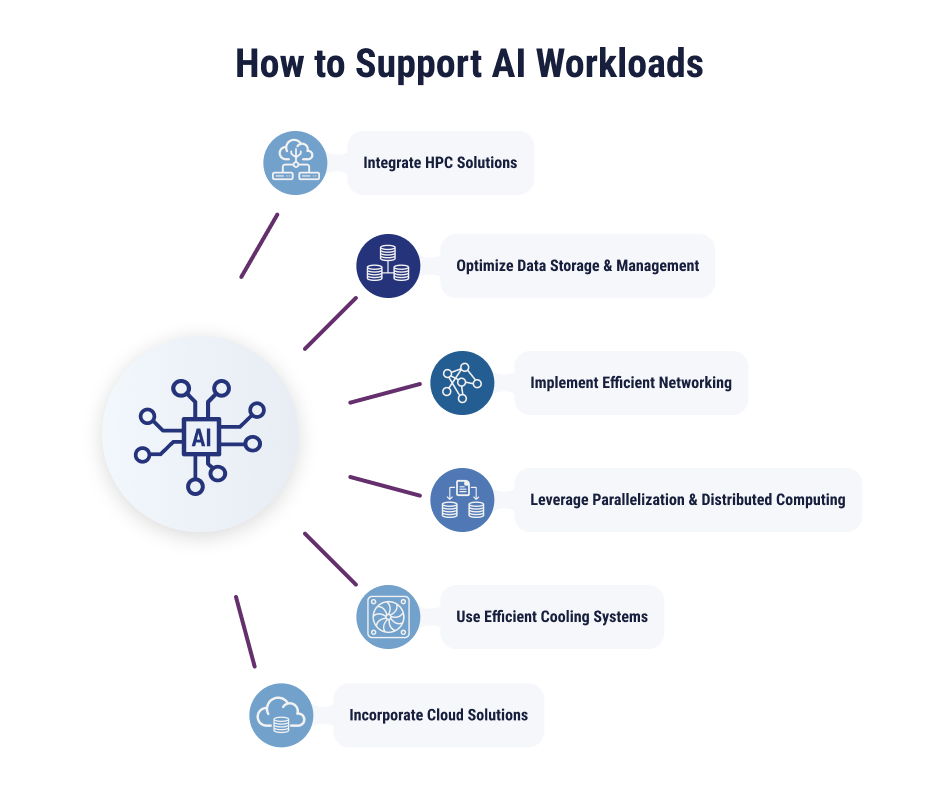
Integrate High-Performance Computing Solutions
Processing power is vital for AI workloads, and good computing density is just the start. High-performance computing (HPC) solutions should also be incorporated. This could include high core count CPUs, GPUs, and AI accelerators called tensor processing units (TPUs). CPUs are good for raw processing, GPUs work best with parallel processing, and TPUs are perfect for machine learning tasks.
Optimize Data Storage and Management
AI models require huge datasets for training, so optimizing storage and management is important to keep operations efficient after deployment. Solid-state drives (SSDs) have fast read/write speeds, so their performance can be optimal for frequently accessed data. Object storage can archive less frequently accessed data.
Implement Efficient Networking
Technologies like Ethernet fabrics can offer higher bandwidth and lower latency than traditional data center networks. Moving between storage, compute resources, and even edge devices at high speeds is essential for AI workloads. Businesses may also consider adding network segmentation and traffic prioritization to direct data flow more efficiently and optimize networking.
Leverage Parallelization and Distributed Computing
Parallelization breaks AI tasks into subtasks and assigns them to multiple computing units. This can accelerate workloads by multiplying efforts. Containerization can also enhance this process further by packaging subtasks with their dependencies, simplifying deployment and enabling consistent execution.
Use Efficient Cooling Systems
Any computing generates heat, but high-performance computing and AI workloads generate significantly more heat than traditional workloads. Effective cooling systems can help you maintain optimal temperatures, reducing the likelihood of equipment breakdown or malfunction. Closed-loop liquid cooling can offer energy-efficient heat dissipation that keeps up with demanding computing.
Incorporate Cloud Solutions
Cloud computing adds the flexibility and scalability required for modern workloads. Businesses can access cloud GPUs on-demand from cloud providers for workloads that need greater-than-average processing power. This can be a more cost-effective alternative to maintaining your own GPU infrastructure in a data center.
What to Look for in a Colocation Provider for AI Workloads
Not all colocation environments are designed to support AI workloads at scale. When evaluating providers, IT leaders should look for:
- High-density power support: Capacity to support GPU-dense deployments and future growth as AI workloads scale.
- Advanced cooling options: Cooling capabilities designed for high-density racks, including liquid, hybrid, or other advanced cooling approaches where needed.
- Cloud connectivity: Direct, low-latency connectivity options to major public cloud providers for hybrid AI architectures.
- Scalable space: The ability to expand cabinet, cage, or suite capacity as compute, storage, and networking requirements grow.
- Resilient infrastructure: Redundant power, cooling, network connectivity, and uptime commitments that support production workloads.
- Managed support options: Remote hands, infrastructure monitoring, managed networking, and operational support for teams without on-site staff.
TierPoint’s AI-ready colocation solutions are designed to support high-density compute, advanced cooling, and cloud connectivity across a national data center footprint.
Unlock the Full Potential of Your AI Workloads
Don’t let technological limitations handcuff your AI workload potential. By employing high-density computing, optimized data storage solutions, effective cooling systems, and more, your organization can take advantage of current AI capabilities and prepare for future developments.
If you feel limited by your current data center situation, TierPoint’s High-Density Colocation services could be your next move. These facilities are designed with AI in mind, ready to accommodate your high-performance workloads.
Learn more about our data center services and business applications of AI and machine learning.
FAQs
What infrastructure do AI workloads require?
AI workloads often require high-performance compute, GPU or accelerator support, scalable storage, low-latency networking, reliable power, and advanced cooling. The exact requirements depend on whether the workload is used for model training, inference, analytics, automation, or real-time processing.
What is the difference between AI training and AI inference workloads?
AI training workloads use large datasets to build or refine a model and typically require significant compute power. AI inference workloads use a trained model to generate outputs, such as recommendations, chatbot responses, predictions, or alerts. Inference often requires low latency and consistent performance, especially for real-time use cases.
Why do AI workloads require high-density infrastructure?
AI workloads can require dense clusters of GPUs, accelerators, storage, and networking equipment. High-density infrastructure allows organizations to support more compute capacity in a smaller footprint while also addressing the power and cooling demands that come with advanced AI systems.
How does cooling impact AI workload performance?
AI and high-performance computing environments generate more heat than many traditional workloads. Effective cooling helps maintain stable operating temperatures, reduce equipment risk, and support consistent performance. For higher-density deployments, advanced cooling approaches such as liquid cooling or hybrid liquid-air cooling may be needed.
When should organizations consider colocation for AI workloads?
Organizations may consider colocation when their current data center cannot support the power, cooling, space, or connectivity requirements of AI workloads. Colocation can also be useful when teams want more control than public cloud alone provides, while still maintaining access to cloud connectivity, scalable infrastructure, and managed support.
What are agentic AI workloads?
Agentic AI workloads involve AI systems that can perform multi-step tasks, make decisions, call tools, or coordinate workflows with limited human input. These workloads can increase infrastructure demands because they may require real-time inference, persistent data access, reliable connectivity, and strong governance.
Table of Contents
-

Artificial Intelligence (AI)
Jul 6, 2026 | by Matt Pacheco
Understanding AI/ML Use Cases: 12 Examples that Drive ROI
VIEW MORE -
Artificial Intelligence (AI)
Jun 17, 2026 | by Daniil Zaika
AI in Cloud Computing: Driving the Future of IT Innovation
VIEW MORE -
Artificial Intelligence (AI)
Jun 3, 2026 | by Matt Pacheco
Why Responsible AI Starts with Secure Infrastructure
VIEW MORE